
Defender Water Shutoff
Resource Center
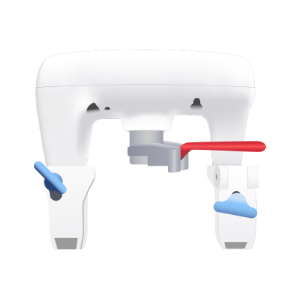
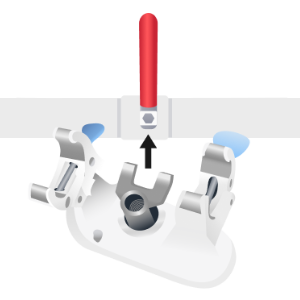
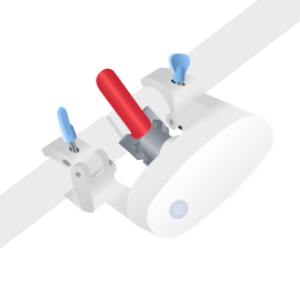
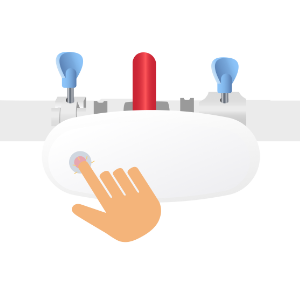
Get to know your device
Meshify Protect App



FAQs & Troubleshooting
General
Installation
LED Lights
Hardware
Protect
How many Water Shutoffs do I need for my home or business?
The number of Water Shutoffs needed will depend on the size of the home/business and/or location of where the user wants to shut off water.
An average-sized single family home or small business will typically just need one Water Shutoff on the main water line.
Will the Water Shutoff automatically close the valve upon a water alert event?
The Water Shutoff is currently configured to operate the valve only with user input.
How can I see the status of the Water Shutoff device?
Status of the Water Shutoff device is viewable on the Protect App. Launch the Protect app, tap devices or locations look for the water shutoff device card.
Will I get an alert when something happens?
Assigned contacts in Protect app account will be notified of status and events related to the Water Shutoff device – valve position, when valve is open/closed, leaks detected by leak probe attached to the Water Shutoff device and more. Notifications/alerts will be based on contact order and communication preferences.
What if I have other questions or require additional support?
If you require further assistance, please contact Sensor Support at (844) 468-1866 or sensorsupport@hsb.com – Monday to Friday, 8am – 8pm Eastern Time.
Can the Water Shutoff device be installed on a gate valve?
The water shutoff is designed to work only with ball valves (which have a handle). Gate valves are not support.
What clearances are required for the Water Shutoff device to be installed and operate?
Prior to installing, check and confirm the clearances around the valve as follows:
½” – 1 ¼” valve – 5.5” x 6” x 3.0” (HxLxW)
1 ¼” – 1 ½” valve – 6.5” x 8” x 3.5” (HxLxW)
The installer may adjust/slide the clamps to suit the piping configuration provided they are properly engaged as shown in the installation instructions.
Why is the leak probe not detecting water?
Check that the leak probe is firmly connected to the auxiliary port.
Check for damage or cuts on the leak probe cable. If the cable is damage or cut, please reach out to Sensor Support (sensorsupport@hsb.com or (844) 468-1866 – Monday to Friday, 8am – 8pm Eastern Time) and request a replacement probe.
Why is the Water Shutoff device continuing to alarm long after a water event?
Leak probe needs to be completely dry as small amounts of water will continue to trigger the leak alarm.
- Disconnect the leak probe and completely dry out the leak probe
- Reconnect the leak probe to the auxiliary port
What if my Water Shutoff device is display no LED lights?
Water Shutoff does not have power.
- Check for power at wall outlet
- Check power supply cable is properly connected to the power adapter
Please check wall outlet has power and power supply cable is properly connected to the power adapter.
What if my Water Shutoff device is displaying a blinking yellow LED light?
The LED light will blink yellow when the Water Shutoff is unable to connect to the gateway. This may be due to gateway losing power or signal connection to the gateway is lost.
- Check gateway power status
- If necessary, move gateway to a location closer to the water shutoff for improved signal connectivity
Note: It may take up to 15 minutes for the gateway connection to confirm
What if the LED is pulsing yellow, but the LED button to open/close the valve is not responding?
LED button lock is enabled and will not respond to LED button press commands.
Disable the LED button lock by:
- Press and hold the LED button for 3 seconds
- Press the LED button 3 times
What if the LED is blinking RED and Buzzer is alerting?
Leak probe attached to the Water Shutoff has detected a leak.
Unplug the leak probe, dry out the leak probe before connecting back to the Water Shutoff device.
What if the LED is pulsing red and valve handle is not completely in open/close position?
Water Shutoff has encountered an obstruction and could not completely open/close the valve. Water Shutoff requires manual recalibration.
- Press and hold the LED button for 5 beeps, then quickly press the button 5 times in a row
- Allow Water Shutoff to complete the full calibration cycle
What happens if I lose power?
The Water Shutoff does not have battery backup and will not operate without power.
- In the event of power loss to the Water Shutoff device, it may take up to 4 hours before the Protect app alerts assigned contacts on the loss of power to the Water Shutoff device.
- If the entire facility/location loses power (gateway is powered from the same circuit) Protect app will notify the assigned contacts that the gateway has switched to battery power. Assigned contacts will have to discern by inference that the outage impacted the Water Shutoff even though it might appear functional in Protect app.
- Upon power restoration, the Water Shutoff device will take steps to automatically recalibrate to the last known valve position. Should the automatic recalibration fail, assigned contact will receive an alert and device would require visual inspection and manual recalibration.
- If it is necessary to operate the shutoff valve while the Water Shutoff device has no power, then you must remove the device from the valve and close the valve by hand.
What if the Water Shutoff device does not completely open or close the valve?
Manual recalibration steps are as follows:
- Press and hold the LED button for 5 beeps, then release
- Quickly press the LED button 5 times in a row
- Allow the Water Shutoff to completely open then close the valve
After successful recalibration, open/close to the desired valve position.
What should I do if the Water Shutoff device moves the valve handle beyond the closed position?
The water valve may be defective and require replacement.
- Power off and uninstall the Water Shutoff
- Check/inspect for ball valve failures
Note: Water Shutoff requires ball valve in good working condition to operate properly. A licensed plumber should be consulted if a repair or replacement is required for the shutoff valve.
I found a small plastic circular ring in the box. What do I do with it?
On rare occasions, a location may have a shutoff valve that has an ultra low profile, where the valve handle is too low for the spring-loaded fork for proper installation of the water shutoff.
In this situation, please use the white, circular plastic ring (spacer) which is designed to fit between the hex bolt head of the valve and the water shutoff fork. The spacer will create adequate space for the water shutoff fork to properly mount and engage the valve handle.
I cannot open/close the valve with the Protect mobile app. What could be wrong?
Check for
- Power and status to the gateway and Water Shutoff device
- Connection status of Smartphone/mobile device
If all power and connection status is good, exit out and re-login to the Meshify Protect app. Then retry open/close valve from the Protect app.
If status of device is ‘Unknown” or “Error”, please recalibate the device.
What if my Water Shutoff status is "Unknown" in Protect app?
This is a safety feature that requires user action. A power outage may have occurred and Water Shutoff cannot properly determine position of the valve handle.
This requires user to manually recalibrate the water shutoff device as follows:
- Go to your Water Shutoff device
- Press and hold the LED button on the Shutoff for 5 beeps, then quickly press the button 5 times in a row
- Allow Water Shutoff to complete the full calibration cycle
What if my Water Shutoff status is "Error" in Protect app?
This is a safety feature that requires user action. A power outage may have occurred and Water Shutoff cannot properly determine position of the valve handle.
This requires user to manually recalibrate the water shutoff device as follows:
- Go to your Water Shutoff device
- Press and hold the LED button on the Shutoff for 5 beeps, then quickly press the button 5 times in a row
- Allow Water Shutoff to complete the full calibration cycle
Still need help?
Contact Sensor Support at (844) 468-1866 or sensorsupport@hsb.com
(Monday–Friday, 8 a.m.–8 p.m. ET), or use our webform below anytime, 24/7.

Meshify is the IoT technology subsidiary of HSB, part of global reinsurer Munich Re.
3500 Jefferson Street #208
Austin, TX 78731
© 2026 Meshify Inc. All Rights Reserved. Privacy Policy