
Activation Instructions
Activate Your Sensor the Smart Way
1. Download and log in to the Meshify Protect app
Create an account if you haven’t already done so. The sensor can be installed using the mobile or web application.

2. Scan the QR on the back of the device
When scanned, the Meshify Protect app will initiate the activation process.
3. Follow the on-screen instructions
Meshify Protect app will guide you step by step through the activation process.
3. You’re all set
The sensor will be up and running in just a few minutes.
Activation Overview
Watch this video to familiarize yourself with your sensor and the activation process.
Step 1
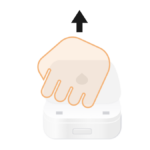
Remove the cover. While at the location you intend to place the sensor, remove the battery cover from the sensor.
Step 2
Pull the tab from the battery and the Meshify Leak & Freeze Sensor will begin searching for cellular signal. Within 5–10 seconds, the LED indicator will blink to signal successful connection to the network and turn off.
If the LED blinks red or does not turn on at all, visit the FAQ section below for troubleshooting.

Step 3
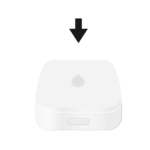
Replace the battery cover and press firmly to close. Place the sensor in the intended location, ensuring that the metal probes on the bottom will make contact with water in the event of a leak.
Next steps
- Finish setup of your sensor in the Protect app, including confirming device online status and device location.
- Complete the activation process with the rest of your devices to protect and monitor your location.
Still need help?
Contact Sensor Support at (844) 468-1866 or sensorsupport@hsb.com
(Monday–Friday, 8 a.m.–8 p.m. ET), or use our webform below anytime, 24/7.

Meshify is the IoT technology subsidiary of HSB, part of global reinsurer Munich Re.
3500 Jefferson Street #208
Austin, TX 78731
© 2026 Meshify Inc. All Rights Reserved. Privacy Policy